On this page
- What a WhatsApp chatbot is and how it works
- What a WhatsApp bot can do for your shop
- Flow or AI? Pick what fits your shop
- Step by step: building a WhatsApp chatbot without code
- 1. Prepare a WhatsApp Business number
- 2. Write the welcome message and main menu
- 3. Build the order flow
- 4. Train the AI agent on your shop
- 5. Enable message templates for notifications
- 6. Test, launch, measure
- Mistakes that make customers hate your bot
- Frequently asked questions
- Does a WhatsApp chatbot need the WhatsApp API?
- Does the bot understand Arabic dialects?
- Can I send promotional messages to customers?
- How much does a WhatsApp chatbot cost?
- Do I need a developer?
- Conclusion
Most small shops in the Middle East sell more on WhatsApp than on any other channel: the customer spots the product on Instagram or Facebook, then messages you on WhatsApp to ask about price, size and delivery. The problem is that the same questions arrive dozens of times a day, often outside working hours, and a customer who gets no answer within minutes simply moves to another shop.
A WhatsApp chatbot solves exactly that: it answers repeated questions instantly, shows the catalog, collects order details and hands anything complex to a person. This guide covers what a bot can realistically do, how to build one without code, and how to avoid the mistakes that make customers hate bots.
What a WhatsApp chatbot is and how it works
A WhatsApp chatbot is software that answers your customers' messages on a WhatsApp Business number automatically, either following a script you design (a flow) or using an AI agent trained on your shop's data. It runs on the WhatsApp Business Platform (API), Meta's official route that lets tools such as Tawwan receive messages, reply to them and send templates.
The difference between a bot and the simple auto-reply in the regular WhatsApp Business app: the app sends one greeting message, while a bot can run a whole conversation with menus, questions, conditions, saved data and human handover.
What a WhatsApp bot can do for your shop
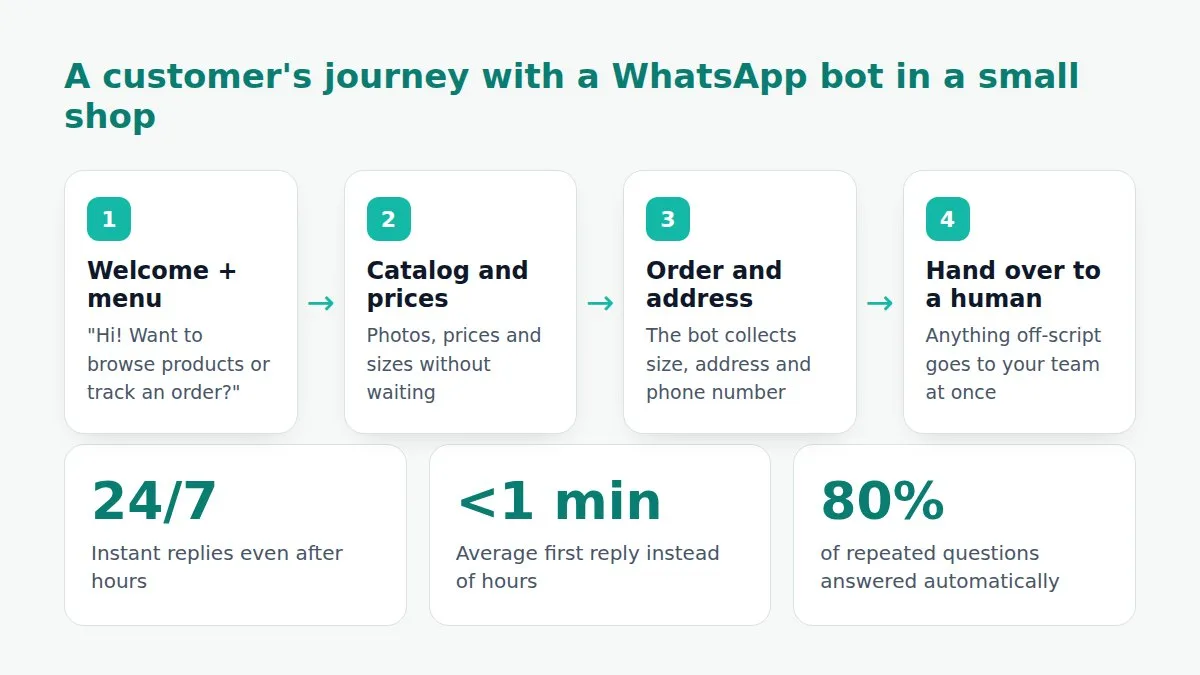
- Answer repeated questions instantly: prices, sizes, opening hours, payment methods, shipping cost per city.
- Show the catalog: photos, products and prices as lists and buttons, so the customer taps instead of typing.
- Take orders: the bot asks for product, quantity, address and phone number, then records the order in the inbox or sends it to your online store.
- Confirm cash-on-delivery orders: an automatic confirmation message cuts fake orders and returns.
- Track shipping: answer "where is my order?" with the tracking number and status.
- After-sales messages: ask for a review, send a discount code for the next order, remind about an abandoned cart.
- Hand over to a person: anything off-script goes to your team at once with the full conversation.
Flow or AI? Pick what fits your shop
| Criteria | Flow (fixed script) | AI agent |
|---|---|---|
| Best for | Defined steps: choosing a product, recording an address, confirming an order | Free-form questions in any wording or dialect |
| Setup | Drag-and-drop blocks | Training on your pages, products and files |
| Control | Total: the bot says only what you wrote | Flexible: answers from the knowledge you trained and hands over when unsure |
| Cost | Included in the plan | Uses AI tokens included in the plans |
Most shops use both: a flow to capture the order step by step, and an AI agent that answers free questions before and after it.
Step by step: building a WhatsApp chatbot without code
1. Prepare a WhatsApp Business number
You need a WhatsApp Business account on Meta's platform and a phone number that is not used in the regular WhatsApp app. In Tawwan, under "Connected accounts", click "Connect WhatsApp" and complete Meta's steps: business verification, number registration and display name. It takes from an hour to a day depending on Meta's review.
2. Write the welcome message and main menu
The first message is the most important one. Keep it short, in your shop's name, with three or four clear button choices: "Browse products", "Track my order", "Talk to a person". Avoid long paragraphs; the customer is on a phone and reads fast.
3. Build the order flow
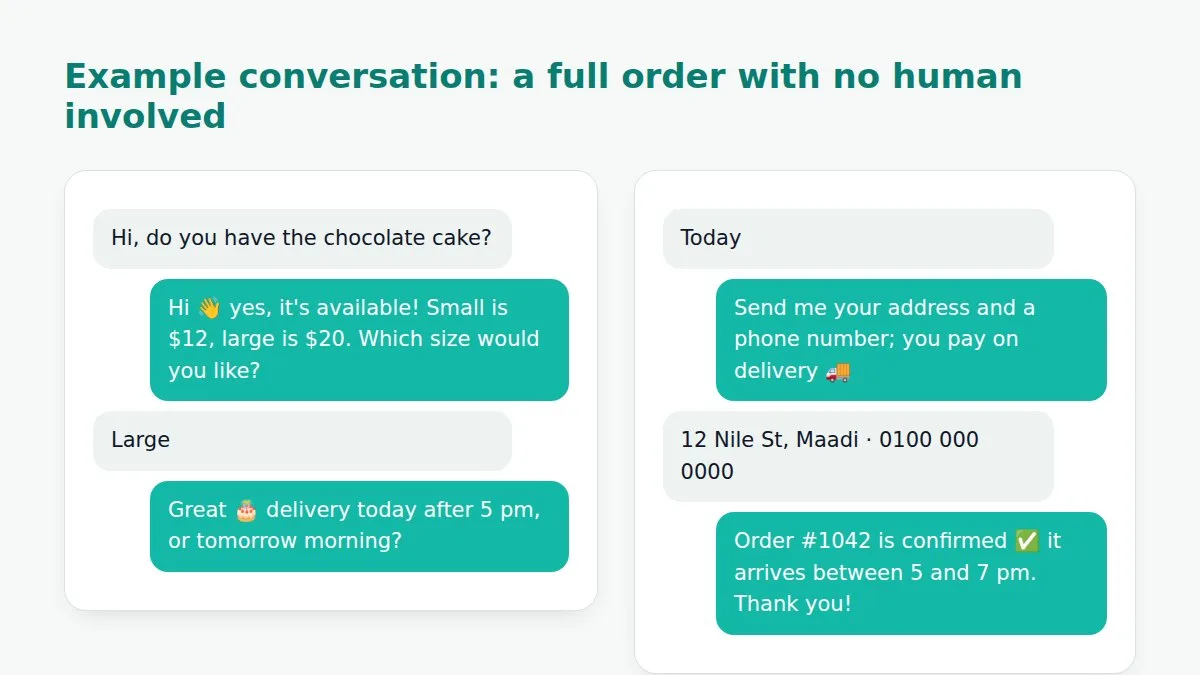
In the flow builder lay out the path: show categories → show products with photos and prices → ask for quantity and size → ask for address and phone → order summary and confirmation. Every answer is saved to the customer's profile, so a returning customer never retypes their address.
4. Train the AI agent on your shop
Upload the product catalog, the shipping and exchange policy and your FAQ. The agent answers in the language and dialect the customer writes in and sticks to the information you trained it on. Tell it when to hand over: when the customer asks for a person, mentions a problem with an order, or asks about something outside its knowledge.
5. Enable message templates for notifications
WhatsApp lets you start a conversation more than 24 hours after the customer's last message only through approved templates. Prepare templates for order confirmation, shipping updates and payment reminders. Meta reviews templates within minutes to hours.
6. Test, launch, measure
Place a test order from your own phone, ask questions in different wordings and note what the bot did not understand. After launch, watch the share of conversations resolved without a person, the average first-reply time and the number of orders the bot recorded. Refine the menu and replies every week based on real questions.
Mistakes that make customers hate your bot
- No way to reach a human: always offer "Talk to a person" at every stage.
- Long, nested menus: more than four options in one menu loses the customer.
- Pretending to be human: say up front that it is an assistant; honesty builds trust.
- One answer for everything: "contact us for details" is not an answer. The bot must actually answer or hand over.
- Ignoring the dialect: if your customers write in dialect, reply in dialect.
Frequently asked questions
Does a WhatsApp chatbot need the WhatsApp API?
Yes. A full bot runs on Meta's WhatsApp Business Platform. The regular WhatsApp Business app only supports simple quick replies.
Does the bot understand Arabic dialects?
A flow relies on buttons and choices, so it needs no language understanding. The AI agent understands Egyptian, Gulf and other dialects in their various wordings and replies in the same style.
Can I send promotional messages to customers?
Yes, through approved marketing templates to customers who opted in. Broadcasts in Tawwan use those templates and honour opt-out requests.
How much does a WhatsApp chatbot cost?
Two parts: the tool's subscription, and WhatsApp conversation fees that Meta charges by country and message type. See Tawwan's plans, which include the bot and the AI agent.
Do I need a developer?
No. Flows are built by drag and drop, the agent is trained by uploading files and links, and connecting WhatsApp is a few steps in Meta's interface.
Conclusion
A WhatsApp chatbot for a small shop is not a replacement for your team; it is the employee who answers 80% of repeated questions within a second and leaves your team the 20% that need a person. Start with a welcome message, a three-option menu and a simple order flow, and grow from there. Try Tawwan free for 14 days and bring WhatsApp, Facebook and Instagram into one inbox.